When Your Collaboration App Knows Where You Are

The Quiet Shift Inside Microsoft Teams
For years, Microsoft Teams has been the digital heartbeat of modern work — the place where meetings happen, chats unfold, and projects inch forward. But a new capability rolling out inside Teams signals something different. Not another productivity feature. Not another integration. This is the moment your collaboration app becomes aware of your physical world, not just your digital one.
Microsoft is introducing automatic location reporting inside Teams. On the surface, it's framed as a security and compliance enhancement. Beneath that polished language, though, sits a deeper transformation — one that could reshape how organizations monitor attendance, enforce hybrid-work policies, and even evaluate employee behavior.
Because once your location becomes a continuously available data point, the question isn't whether it will be used. It's how far organizations will go.
What's Coming — and When
This isn't speculation. According to the Microsoft 365 Roadmap (ID 488800), Teams is rolling out a feature in March 2026 that automatically detects when a user connects to their organization's Wi-Fi and updates their work location to reflect the specific building they're in. The feature was originally slated for December 2025, then pushed to February 2026, and has now been delayed again to early-to-mid March.
Microsoft's own description reads: "When users connect to their organization's Wi-Fi, Teams can automatically set their work location to reflect the building they are working in." The stated purpose is to help colleagues coordinate and connect in person. The feature applies to Teams desktop clients on both Windows and Mac.
To their credit, Microsoft has made this opt-in — disabled by default, with tenant admins deciding whether to enable it and end users retaining the ability to opt out. That's a meaningful distinction, and it came after Microsoft quietly revised the feature description following initial user backlash. But the timing tells its own story. Microsoft's own return-to-office mandate — requiring employees within 50 miles of an office to work onsite at least three days a week — took effect in early 2026. The location tracking feature arrives weeks later. Whether that's coincidence or choreography, the optics aren't great.
And as Nik Kale, principal engineer and product architect at Cisco Systems, noted: location signals seem simple on their own, but in a corporate environment, they become powerful metadata. When combined with other activity patterns, they can reveal working habits, interpersonal interactions, and even inferred performance signals.
The Human Side of a Technical Feature
Picture a typical hybrid workplace.
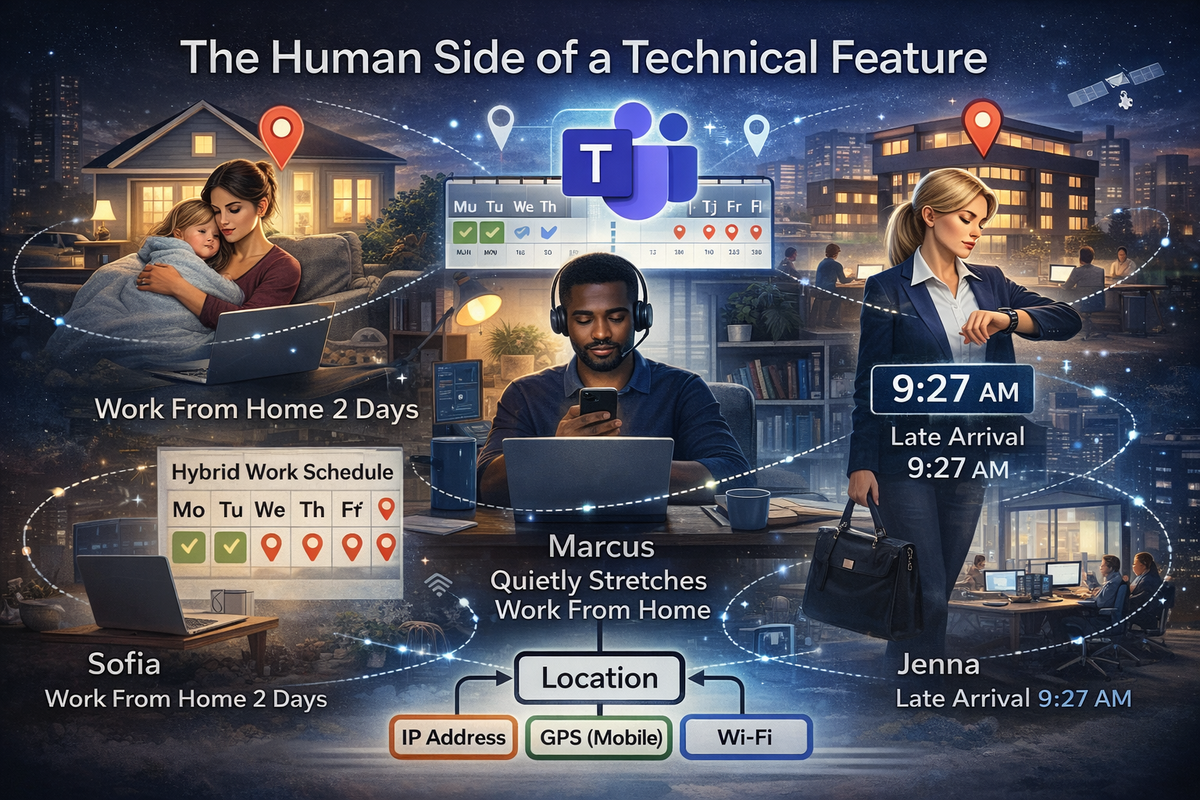
Sofia follows a "two days at home, three days in the office" schedule. She's diligent, but life happens — a sick child, a late appointment, a day she swaps without telling her manager. With automatic location reporting, her weekly routine becomes verifiable at a glance.
Marcus prefers working from home. He's productive there, but his team expects him in the office twice a week. If he quietly stretches that rule, Teams' location logs could surface the pattern instantly.
Jenna arrives at the office at 9:27 AM instead of 9:00 AM. She stays late, works hard, and delivers results. But a system that quietly logs her arrival time could paint a different picture — one that doesn't capture the full story.
None of these scenarios requires new surveillance tools. They simply leverage the location signals Teams already collects — and is about to collect more aggressively.
What's Actually Changing Inside Teams
Microsoft's own roadmap and documentation make the direction clear: Teams is becoming a location-aware platform by design.
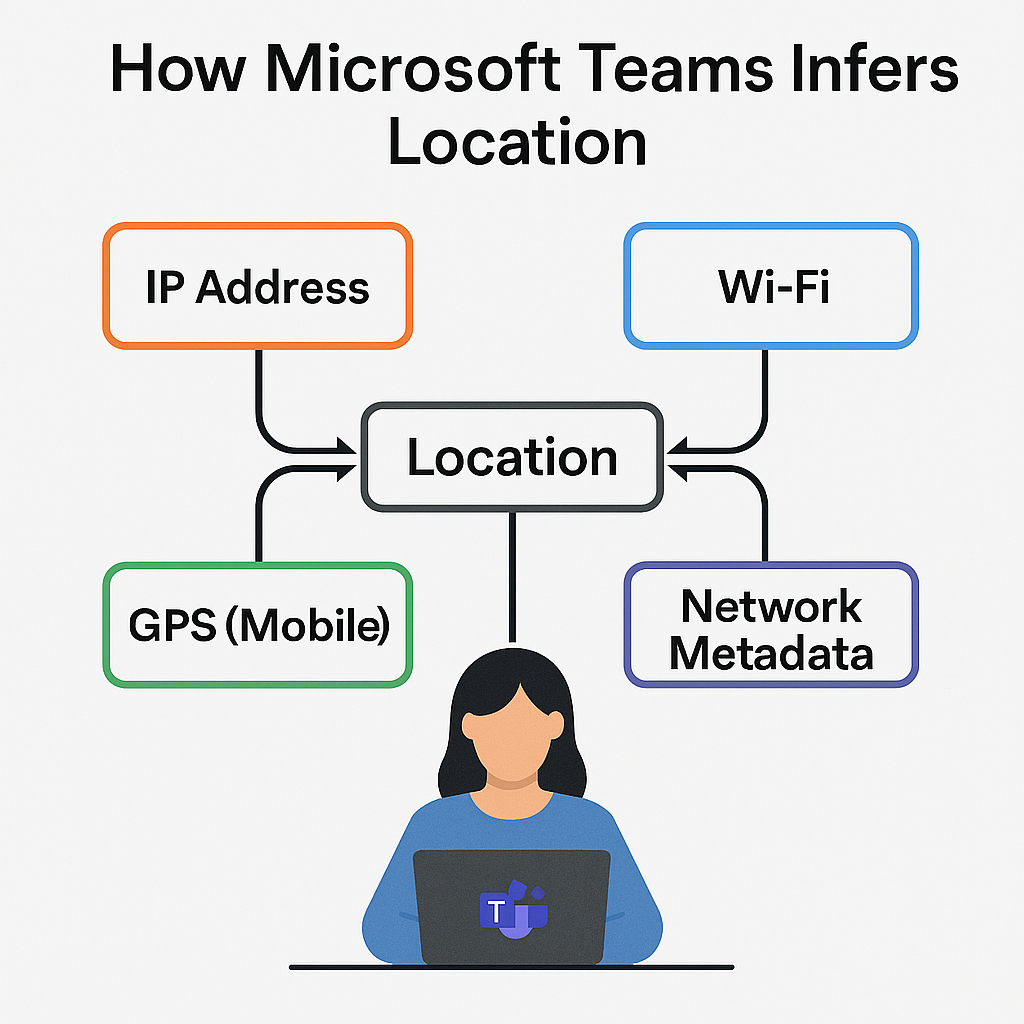
Automatic location reporting is the headline change. Teams will detect and share a user's location with their organization using IP addresses, Wi-Fi network metadata, and device identifiers. Officially, this supports compliance, shift management, safety notifications, and conditional access. Unofficially, it creates the foundation for attendance verification and hybrid-work enforcement.
Dynamic emergency location is already live. Teams determines a user's physical location for emergency calling through network identifiers, Wi-Fi access points, and GPS on mobile devices. That infrastructure, once in place, makes continuous location inference trivial to layer on top.
Location-based access policies allow admins to restrict Teams features based on geographic region. Originally designed for data sovereignty, these controls are equally capable of enforcing physical presence requirements.
And then there's what Teams already logs every day — sign-in IPs, device types, network locations, activity timestamps. Individually, these signals seem harmless. Together, they form a near-continuous picture of where an employee is and when.
The Depth of Tracking Is Already Remarkable
Across the Microsoft 365 ecosystem, location data is deeply embedded in ways most users never see.
The Teams Admin Center already surfaces city, region, network type, and sign-in location in its reports. Microsoft Entra captures IP addresses, geo-IP location, and conditional access evaluations on every login. Teams Shifts lets frontline managers require GPS-based location check-ins and verified clock-in/out locations. And the Microsoft Graph API exposes sign-in location, device location metadata, and network location to any connected system — meaning HR, security, and analytics platforms can ingest this data automatically.
What gets shared without you doing anything? IP-based location, network metadata, device type, sign-in timestamps, and location for emergency services. GPS tracking on desktop still requires explicit permission. But IP-based tracking does not. That distinction matters more than most people realize.
Why Microsoft Is Doing This
The motivations are legitimate, and worth stating plainly.
Location is a risk signal in Zero Trust security architectures. Conditional Access rules depend on it. Certain regulated industries require location verification for specific workflows. Laws like Kari's Law and RAY BAUM's Act mandate accurate location data for emergency calling. Frontline workforce management — scheduling, safety check-ins, clock-in verification — depends on knowing where people are. And Microsoft's own Workplace Insights and productivity analytics already use location as a dimension.
Every one of those use cases is defensible. But legitimate capabilities can still be repurposed — especially in organizations pushing aggressive return-to-office mandates where the temptation to treat location logs as an attendance scorecard is hard to resist.
This Isn't Just Microsoft
It's worth noting that Microsoft isn't doing anything the rest of the industry hasn't already started. Google Workspace logs IP-based location and supports geofencing. Slack captures IP, device metadata, and activity patterns. Zoom tracks IP, device, and network metadata. Workday, Kronos, and ADP require GPS for clock-in/out and support geofencing.
The difference is scale. Teams is used by over 300 million people. When a platform that large becomes location-aware, the implications ripple across the entire global workforce in a way that smaller tools simply can't match.
The Real Risk: Normalization
This is where it gets uncomfortable.
Privacy advocates have been warning about this trajectory for years, and the concern isn't hypothetical. Most Teams users have no idea the platform logs their location. That lack of transparency is the first problem. The second is how easily compliance-oriented data can slide into enforcement-oriented data — attendance tracking, disciplinary actions, movement pattern analysis. The third is the sheer normalization of it. When monitoring happens quietly, at massive scale, inside a tool people already trust, it stops feeling like surveillance. It just feels like work.
The technology itself isn't harmful. Microsoft isn't building a tracking tool — it's building a collaboration platform with location capabilities. But the governance decisions organizations make around this data will determine whether it remains a helpful compliance feature or becomes a quiet expansion of workplace oversight that employees never consented to in any meaningful way.
Doug Dennerline, CEO of performance enablement platform Betterworks, put it bluntly: many companies pushing RTO mandates alongside tracking features are overlooking a critical reality — flexibility, autonomy, and trust are now the biggest drivers of employee productivity and retention, not physical presence. Forcing employees back and then monitoring their movements sends a clear message: we don't trust you.
And the research backs this up. Studies on workplace surveillance consistently show that monitoring is associated with increased job pressure, reduced autonomy, and privacy violations — the very things that erode the engagement companies claim they're trying to protect. As public health lawyer Dawn M. Hunter has argued, organizations must be transparent about what's monitored and create clear policies that welcome employee input. A human-centered workplace balances reasonable business needs with systems that support healthy, thriving employees.
Where We Go From Here
Automatic location reporting inside Teams isn't a small update. It's a structural shift in how digital platforms understand — and potentially influence — the physical behavior of employees.
Organizations adopting these capabilities need to communicate transparently about what's being collected. They need to establish clear boundaries between security use cases and behavioral monitoring. Privacy notices need updating. Regional privacy laws need honoring. And location data should never become a blunt instrument for enforcing policies that would be better served by trust and conversation.
Employees deserve to know what's being collected, why it's being collected, and how it will — and won't — be used.
Hybrid work was built on a promise of trust. Features like this will test how strong that promise really is.